

Introduction
Over the past few years, the software engineering community has moved rapidly through the phases of generative AI adoption. We began with simple autocomplete utilities, transitioned to chat-based inline assistants, and are now standing on the precipice of a much more profound shift: the Software Factory pattern.
In my work analyzing engineering organizations, I have observed a persistent bottleneck. While individual developers using tools like GitHub Copilot or Cursor experience localized speedups, the broader software development lifecycle (SDLC) remains bound by manual coordination. A developer must still read a ticket, set up the local branch, write the implementation, run the tests, fix linting errors, open a pull request, and wait for a human review. The cognitive load of context-switching between these tasks limits the throughput of even the most talented teams.
The Software Factory pattern addresses this bottleneck by shifting the unit of work from manual code generation to autonomous, goal-driven agent loops. Instead of acting as an interactive calculator for code, the AI operates as an asynchronous worker. It takes a structured goal—such as a bug report or a feature specification—and executes a closed-loop cycle of planning, writing code, running local test suites, self-correcting based on compiler or test output, and ultimately presenting a verified pull request for human approval.
Transitioning to this model requires a fundamental re-engineering of how we manage state, verify correctness, and orchestrate workflows. In this article, I will detail the architectural mechanisms of the Software Factory, explain how to use existing project management tools like Linear and Notion as external state machines, and outline the concrete guardrails necessary to scale agentic code generation safely.
The Anatomy of the Software Factory Pattern
To understand the Software Factory, we must first deconstruct the limitations of standard, ad-hoc AI coding assistants. When a developer uses an inline chat to generate a function, the loop is tightly coupled to the developer's active session. The developer acts as the compiler, the test runner, and the state manager. If the generated code fails to compile, the developer must manually feed the error back into the LLM. This is a synchronous, high-overhead process.
In contrast, the Software Factory pattern decouples the execution of the task from the developer's active attention. It relies on a goal-driven agent loop that operates asynchronously. The core anatomy of this pattern consists of five distinct phases:
- Ingestion and Context Assembly: The agent receives a structured issue (e.g., a Linear ticket) containing a description of the desired change. It queries the codebase using semantic search, abstract syntax tree (AST) parsers, or dependency graphs to locate the relevant files, classes, and functions. It then constructs a localized context window containing only the necessary code snippets and API definitions.
- Planning: Before writing any code, the agent generates a step-by-step execution plan. This plan is represented as a structured JSON object or a markdown document outlining which files will be modified, what new tests will be written, and what dependencies must be updated. This plan can be exposed to a human operator for approval before execution begins.
- Execution (The Inner Loop): The agent enters an iterative execution phase. It applies modifications to a local workspace. This is not a single-shot generation; the agent uses specialized tools to read, write, and patch files incrementally.
- Verification (The Feedback Loop): Once the modifications are applied, the agent executes the local test suite, linter, and type checker. If any of these tools fail, the agent captures the stdout/stderr output, appends it to its execution history, and enters a self-correction loop. It attempts to diagnose the failure, modify the code, and re-run the tests. It repeats this cycle until all checks pass or a pre-configured iteration limit is reached.
- Promotion and Hand-off: Once the verification step succeeds, the agent commits the changes, pushes them to a remote branch, opens a pull request, and updates the status of the tracking ticket to signal that it is ready for human review.
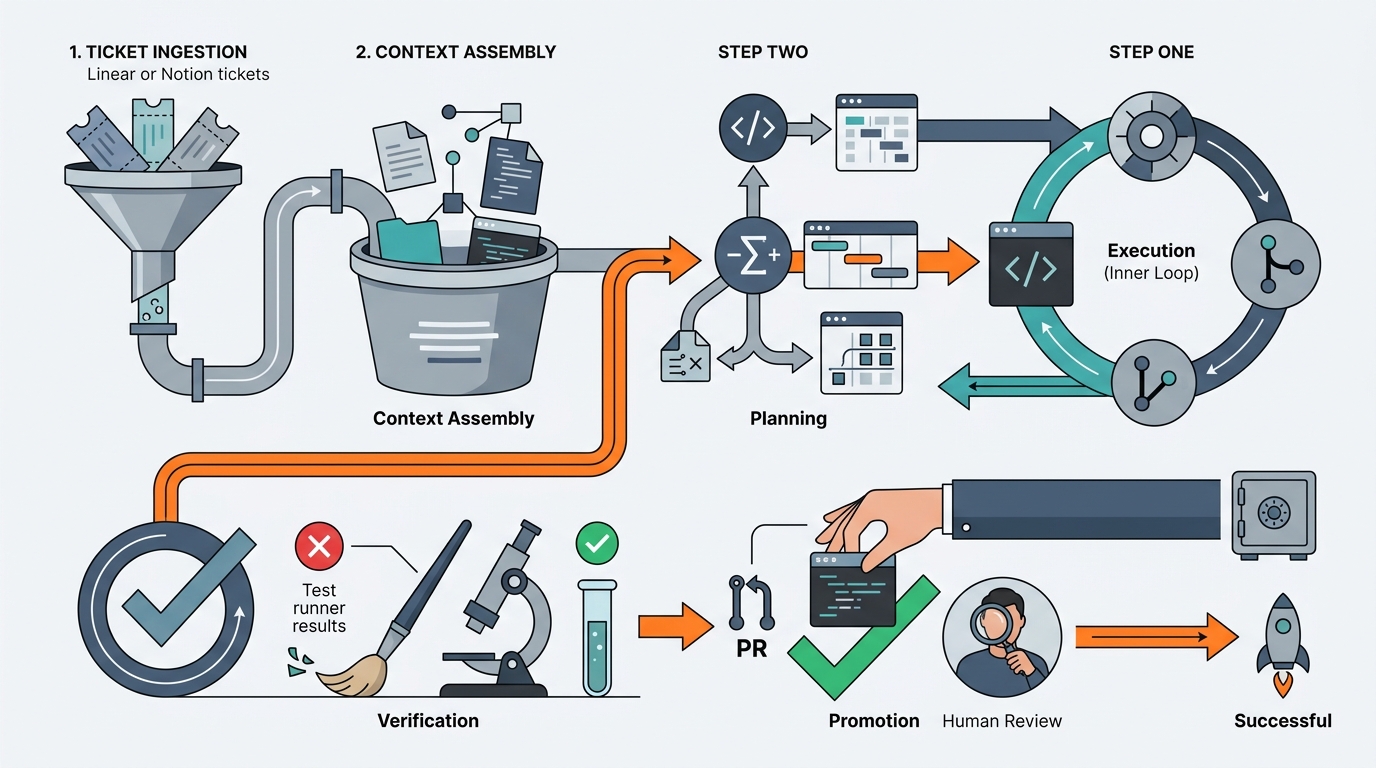
This architecture transforms the LLM from a passive text predictor into an active agent capable of tool use, environment interaction, and self-correction. However, running these loops in a vacuum is dangerous. Without a robust external state machine, agent loops can easily run amok, consuming millions of tokens in infinite loops or overwriting critical code. This is where state management integration becomes critical.
Orchestrating State Management with Linear and Notion
One of the most common mistakes I see engineering teams make when experimenting with agents is trying to build a custom, proprietary state management dashboard from scratch. This is an unnecessary duplication of effort that introduces massive operational friction. Your engineering team already has a highly optimized, collaborative state machine: your project management system.
Tools like Linear, Jira, and Notion are designed to track the state of software delivery. They define workflows (e.g., Backlog -> Todo -> In Progress -> In Review -> Done), manage assignees, and store historical context. By integrating your agent loops directly with these systems, you achieve three critical outcomes:
- Natural Observability: Non-technical stakeholders and engineering managers can track agent progress using the exact same boards they use for human developers. There is no need to log into a separate terminal or monitoring tool to see what the agent is doing.
- Seamless Human-in-the-Loop (HITL) Gates: You can use ticket state transitions as triggers for agent behavior. For example, moving a ticket from
TodotoAssign to Agentcan trigger a webhook that initiates the agent loop. Moving a ticket toIn Reviewcan signal that the agent has completed its work and is waiting for a human to review the PR. - Context Preservation: The ticket itself serves as the historical record of the agent's attempts, failures, and decisions. If an agent fails to resolve an issue after five attempts, it can write a detailed summary of its findings back to the ticket comments, allowing a human developer to take over exactly where the agent left off.
To implement this, you must treat your project management tool's API as the primary orchestrator. For example, when using Linear, you can configure webhooks to listen for changes to issues. When an issue is updated with a specific label (e.g., agent-execute), your orchestration server receives a payload containing the issue ID, title, description, and metadata.
My recommended architecture involves a lightweight orchestration service (written in Python or TypeScript) that acts as the bridge between Linear and your agent runtime. This service is responsible for parsing the webhook payload, provisioning a secure execution environment (such as a sandboxed Docker container), cloning the target repository, and invoking the agent loop with the ticket details as the primary instruction.
Implementing the Verification Gate and Guardrails
Code generation is relatively easy; verifying that the generated code is correct, secure, and performant is where the real challenge lies. If you allow autonomous agents to push code directly to your main branch without rigorous, multi-layered validation, you will quickly degrade your codebase and introduce critical regressions.
I advise establishing a strict "Zero Trust" policy regarding agent-generated code. The agent must never have direct write access to your main branch. Every change must pass through a multi-stage verification gate before it can even be considered for a human review.
Here is a practical Python implementation of an orchestrator-level verification loop. This script demonstrates how to run an agent execution step, capture the output of a local test suite, and feed any failures back into the agent for self-correction:
import subprocess
import os
from typing import Dict, Any

class AgentVerificationLoop:
    def __init__(self, workspace_path: str, max_attempts: int = 3):
        self.workspace_path = workspace_path
        self.max_attempts = max_attempts

    def run_verification(self) -> Dict[str, Any]:
        """Runs the project's test suite and returns the status and output."""
        try:
            # Run pytest within the sandboxed workspace
            result = subprocess.run(
                ["pytest", "tests/"],
                cwd=self.workspace_path,
                capture_output=True,
                text=True,
                timeout=60
            )
            return {
                "success": result.returncode == 0,
                "stdout": result.stdout,
                "stderr": result.stderr
            }
        except subprocess.TimeoutExpired:
            return {
                "success": False,
                "stdout": "",
                "stderr": "Test suite execution timed out after 60 seconds."
            }

    def execute_agent_loop(self, agent_runner) -> bool:
        """Orchestrates the write-test-correct loop for the agent."""
        for attempt in range(1, self.max_attempts + 1):
            print(f"[Attempt {attempt}/{self.max_attempts}] Invoking agent to apply changes...")

            # Step 1: Let the agent write or modify code
            agent_runner.apply_next_patch()

            # Step 2: Run the verification gate
            verification = self.run_verification()

            if verification["success"]:
                print("[Success] All tests passed. Code is verified.")
                return True

            print(f"[Failure] Tests failed on attempt {attempt}. Feeding errors back to agent.")

            # Step 3: Provide the compiler/test failures back to the agent's context
            error_context = (
                f"Test execution failed.\n"
                f"Stdout:\n{verification['stdout']}\n"
                f"Stderr:\n{verification['stderr']}"
            )
            agent_runner.append_system_message(error_context)

        print("[Error] Agent failed to resolve the issue within the maximum attempts.")
        return False
Beyond unit tests, your verification gate must include static analysis and security scanning. Agents are notorious for introducing subtle security vulnerabilities, such as hardcoded API keys, SQL injection vulnerabilities, or insecure dependency versions.
To mitigate this, I recommend integrating tools like Bandit (for Python), Semgrep, or SonarQube directly into the verification loop. If the static analysis tool detects a high-severity vulnerability, the verification gate must fail, and the agent must be forced to remediate the vulnerability before proceeding.
Operational Realities, Cost Control, and Human-in-the-Loop
Transitioning to a Software Factory pattern is not merely a technical challenge; it is an operational one. When you scale from a single developer using an AI assistant to dozens of autonomous agent loops running concurrently, you will encounter new failure modes that do not exist in traditional development workflows.
1. Token Budgeting and Cost Control
Autonomous loops can consume tokens at an alarming rate. If an agent gets stuck in an infinite loop trying to fix a flaky test, it can easily run through hundreds of dollars of LLM API credits in a matter of minutes. To prevent this, you must implement strict guardrails:
- Hard Iteration Limits: Never allow an agent loop to run indefinitely. Set a hard limit (typically 3 to 5 iterations) on self-correction attempts.
- Token Budgets per Ticket: Track the total tokens consumed by a specific ticket ID. If the consumption exceeds a predefined threshold (e.g., $5.00 USD equivalent), suspend the loop and alert a human.
- Model Tiering: Use cheaper, faster models (like GPT-4o-mini or Claude 3.5 Haiku) for initial context gathering, linting, and basic syntax generation. Reserve the most expensive, highly capable models (like Claude 3.5 Sonnet or GPT-4o) for complex planning and reasoning tasks.
2. Handling Flaky Tests and Environment Drift
If your test suite is flaky, your agent loops will fail consistently. An agent cannot distinguish between a legitimate code regression and a flaky integration test that failed due to a network timeout. It will waste valuable cycles trying to "fix" code that is already correct.
Before deploying the Software Factory pattern, you must invest in cleaning up your test suite. If certain tests are notoriously unstable, quarantine them or configure the agent's verification gate to run only a deterministic subset of unit tests.
3. Designing Effective Human-in-the-Loop (HITL) Gates
Human-in-the-loop is not an afterthought; it is a core architectural component of the Software Factory. The goal is not to eliminate humans, but to elevate them to the role of reviewers and orchestrators.
I recommend establishing three distinct HITL touchpoints:
- Plan Review: For complex tickets, require a human to approve the agent's generated markdown plan before the agent is allowed to write any code. This prevents the agent from refactoring large swaths of the codebase unnecessarily.
- Pull Request Review: Treat the agent's pull request exactly as you would a junior developer's PR. Run your standard CI/CD pipeline, and require at least one senior engineer to review and approve the changes before merging.
- Post-Mortem Analysis: When an agent fails to resolve a ticket and hands it off to a human, the human should document why the agent failed. Was the prompt unclear? Was the context window missing critical files? Use these insights to refine your system prompts and context assembly algorithms.
To help visualize how these operational paradigms compare to traditional development models, I have compiled the following comparison table:
| Dimension | Ad-hoc AI Assistants (Copilots) | Autonomous Software Factory Loops |
|---|---|---|
| Execution Model | Synchronous, interactive, developer-driven | Asynchronous, goal-driven, event-triggered |
| State Management | Local editor state, developer memory | External tracking tools (Linear, Notion, Jira) |
| Error Recovery | Manual copy-pasting of errors by human | Automated write-test-correct self-correction loop |
| Verification | Relies on human running tests manually | Automated gates (AST, unit tests, security scanners) |
| Primary Cost Metric | Flat monthly seat license | Variable API token consumption per ticket |
| Human Role | Active writer, editor, and compiler | Strategic planner, reviewer, and gatekeeper |
Conclusion
The Software Factory pattern represents a fundamental evolution in software engineering. By shifting from manual, interactive code generation to autonomous, goal-driven agent loops, organizations can dramatically increase their development velocity while maintaining strict control over code quality.
However, success with this pattern requires moving past the hype and focusing on the unglamorous engineering work: building robust verification gates, establishing strict token budgets, cleaning up flaky test suites, and integrating deeply with existing state management tools like Linear and Notion.
If you are looking to adopt this pattern in your organization, I recommend starting small. Select a single, well-defined repository—such as an internal utility library or a service with high test coverage. Configure a basic agent loop triggered by a specific Linear label, implement the verification loop outlined above, and observe how your team interacts with the resulting pull requests. Use those initial learnings to refine your guardrails, and gradually scale the pattern across your broader engineering organization.