
The Shift to Multi-Agent Engineering Systems
For the past several years, engineering leaders have operated in a state of tactical experimentation with Generative AI. We started by provisioning individual licenses for inline autocomplete tools, moved to adopting chat interfaces for codebase exploration, and are now deploying specialized agents to automate isolated tasks like pull request reviews, test generation, and migration scripts. However, this bottom-up adoption has hit a hard ceiling.
As we transition from single-purpose assistants to fully autonomous, multi-agent workforces—where agents interact with other agents, runtimes, and external APIs—we are confronting a chaotic operational reality. Engineering organizations are currently building fragile, bespoke orchestration layers. They are struggling with unpredictable API token costs, facing severe security risks from unmonitored code-execution environments, and lacking any standardized governance framework to manage these digital workers.
JetBrains has addressed this systemic challenge with the launch of Air, an open system designed to standardize multi-service orchestration and team governance for agentic software development. Rather than offering another closed, single-vendor AI assistant, JetBrains is positioning Air as an infrastructure layer. It is designed to coordinate, govern, and audit heterogeneous agentic systems across an entire enterprise.
In my analysis, this release represents a mature pivot in how we manage engineering organizations. It acknowledges that the future of software engineering is not a single, monolithic AI model, but a complex, multi-vendor ecosystem of specialized agents that must be managed with the same rigor, security, and observability we apply to human developers and microservices. I want to dissect the architectural mechanics of JetBrains Air, evaluate its governance and cost-control frameworks, explore how it standardizes team workflows, and provide a pragmatic roadmap for engineering leaders preparing to operationalize agentic workforces.
The Architecture of Agentic Orchestration: Deconstructing JetBrains Air
To understand why JetBrains Air is a significant departure from existing tools, we must first look at the architectural limitations of first-generation AI coding assistants. Tools like GitHub Copilot or JetBrains' own early AI Assistant offerings operate primarily on a request-response model tightly coupled to the IDE. The user initiates an action, the IDE gathers local context (such as open files, git diffs, and project structures), sends this context to a language model, and returns the generated text or code.
This model breaks down when applied to autonomous, multi-step engineering tasks. An agentic workflow requires an agent to plan a series of actions, execute tools (such as running a compiler, executing a test suite, or querying a database), inspect the output, self-correct if an error occurs, and iterate until a goal is met. This requires state preservation, long-running execution environments, and a robust integration fabric.
JetBrains Air addresses this by acting as an open, decoupled orchestration engine. It does not force you to use a specific LLM or a proprietary agent framework. Instead, it provides a standardized platform that sits between your development environments (IDEs, CI/CD pipelines, issue trackers), your execution environments, and your AI agents—whether they are built on LangChain, AutoGen, CrewAI, or proprietary internal frameworks.
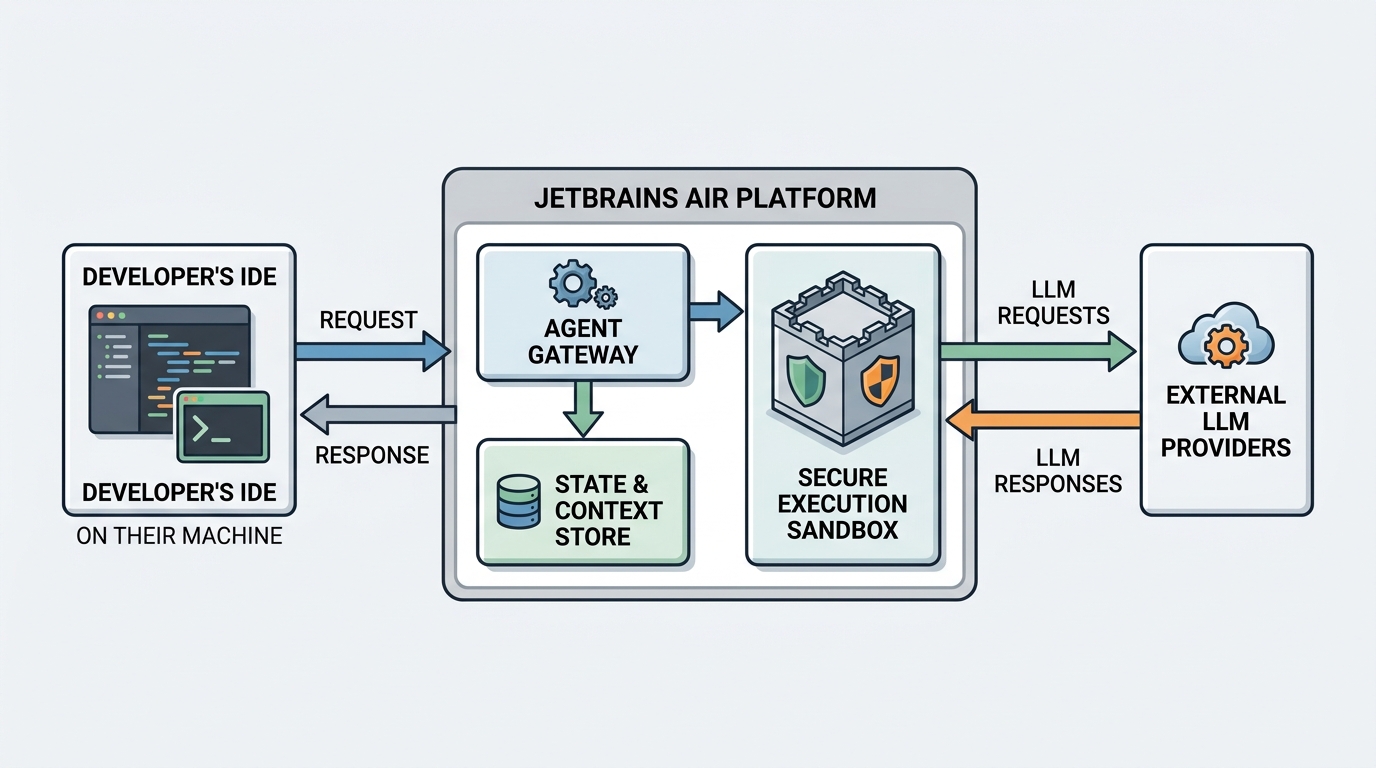
At the core of Air's architecture are three primary components:
The Agent Gateway and Router: This layer manages the secure routing of requests between human developers, agents, and LLM providers. It abstracts the underlying model APIs, allowing organizations to swap out models (e.g., moving from OpenAI's GPT-4o to Anthropic's Claude 3.5 Sonnet or a self-hosted Llama 3.1 instance) without rewriting agent logic. It also handles rate limiting, model fallback strategies, and request queuing.
The Execution Sandbox (Secure Runtimes): One of the most critical security vulnerabilities in agentic development is giving an AI model the ability to execute arbitrary code on a developer's local machine or within a production network. Air addresses this by orchestrating ephemeral, isolated sandboxes. When an agent needs to run a test suite, compile code, or execute a shell script, Air spins up a secure container. This container is pre-configured with the necessary toolchains, libraries, and environment variables, allowing the agent to execute code safely without risking host system compromise or lateral network movement.
The State and Context Store: Unlike simple chat interfaces, agentic workflows can span hours or even days. Air maintains a persistent, versioned state machine for every agentic task. This store tracks the agent's plan, the tools executed, the inputs and outputs of those tools, and the current state of the codebase. If an agent is interrupted—or if a human developer needs to intervene and redirect the agent—the state store allows the workflow to resume seamlessly without losing progress or wasting tokens by re-running previous steps.
By decoupling the orchestration layer from the underlying models and IDEs, Air solves a major engineering bottleneck. It provides a consistent runtime and communication protocol for agents, allowing developers to build and deploy agents that work across different IDEs (including VS Code, JetBrains IDEs, and web-based environments) and CI/CD platforms.
Governance, Cost Control, and Resource Allocation in Agentic Workflows
As engineering leaders, our primary responsibility is to balance velocity with risk and fiscal discipline. When we transition from human-centric development to agentic workforces, our traditional governance frameworks become obsolete. We cannot manage agentic costs, security, or access control using the same mechanisms we use for human engineers.
Consider the economics of agentic workflows. A human engineer writing code does not incur a direct marginal cost per keystroke or per compilation. An agentic workflow, however, operates on a highly variable cost model driven by LLM token consumption. A poorly optimized agent stuck in an infinite loop—repeatedly modifying a file, running a failing test, and sending the entire codebase context back to an LLM to debug the failure—can easily consume hundreds of dollars in API fees in a single afternoon.
JetBrains Air introduces a comprehensive governance framework designed to prevent these runaway scenarios. I categorize these governance controls into three main pillars: financial guardrails, security policies, and operational auditing.
Financial Guardrails and Token Budgeting
Air allows engineering leaders to establish granular, multi-tiered token and cost budgets. These budgets can be applied at the organizational, team, project, or individual agent execution level.
| Governance Dimension | Control Mechanism | Operational Benefit |
|---|---|---|
| Token Budgeting | Hard and soft caps on API spend per user, team, or agent run. | Prevents runaway costs from infinite loops or inefficient agent planning. |
| Human-in-the-Loop (HITL) | Mandatory approval gates for high-cost or high-risk actions. | Balances autonomy with safety; prevents unauthorized deployments or expensive API calls. |
| Model Tiering | Policy-driven routing to appropriate models based on task complexity. | Optimizes cost by using cheaper models for simple tasks and reserving frontier models for complex reasoning. |
| Context Pruning | Automatic truncation and summarization of historical execution state. | Minimizes token bloat in long-running agent conversations. |
For example, you can configure a policy within Air that grants a junior developer's agent a maximum budget of $10 per day, while allowing a specialized release-migration agent a budget of $200 for a weekend run. If an agent reaches a soft cap, Air sends an alert to the developer or team lead. If it hits the hard cap, Air automatically pauses the agent's execution state, saving its progress and preventing further token consumption until a human reviews and approves an extension.
Security Boundaries and Code Leakage Prevention
Data privacy and intellectual property protection are paramount when integrating external LLMs into your development lifecycle. Air acts as a secure proxy that inspects all incoming and outgoing payloads.
I find Air’s data-masking capabilities particularly valuable. Before any context is sent to an external LLM provider, Air can automatically scan the payload for personally identifiable information (PII), proprietary API keys, database credentials, and highly sensitive internal IP. It masks or redacts this data in transit and restores it when the model's response is returned to the local execution environment. This ensures that your proprietary business logic and secrets never leave your secure perimeter, satisfying the stringent requirements of compliance frameworks like SOC 2, ISO 27001, and GDPR.
Furthermore, Air implements strict access control lists (ACLs) for agents. Just as you would not grant a junior intern admin access to your production database, you should not grant an autonomous agent unrestricted access to your internal services. Air allows you to define precisely what tools, databases, and APIs an agent can access, enforcing the principle of least privilege across your entire digital workforce.
Operational Auditing and Explainability
When an autonomous agent commits code to your main branch, you must be able to trace exactly why and how that code was generated. Traditional git commit histories are insufficient for this level of accountability.
Air provides a complete, immutable audit trail of every agentic execution. This "black box recorder" captures the exact prompt chain, the model responses, the tool outputs, the state of the sandbox at each step, and any human interventions. If a production incident occurs and is traced back to an agent-generated change, your engineering team can replay the agent's execution step-by-step to understand the root cause of the failure. This level of observability is not just a debugging aid; it is a fundamental requirement for regulatory compliance in industries like financial services, healthcare, and aerospace.
Standardizing Team Workflows and Integration Topology
One of the greatest points of friction in modern software engineering is tool sprawl. Every time we introduce a new SaaS tool or automation framework, we add cognitive load to our developers, who must learn new interfaces, manage new credentials, and context-switch between disparate systems.
JetBrains Air addresses this by integrating directly into the existing developer workflow. It does not ask developers to abandon their preferred IDEs, issue trackers, or code review platforms. Instead, it acts as an invisible, unifying orchestration fabric that connects these systems.
The Developer Experience: Seamless Collaboration with Agents
In an Air-enabled workflow, agents are treated as first-class team members. They have their own profiles, can be assigned tasks in issue trackers (like Jira, YouTrack, or GitHub Issues), and can participate in pull request discussions.
For example, a typical workflow might look like this:
- Task Assignment: An engineering manager assigns a ticket to an autonomous agent within YouTrack to upgrade a legacy Spring Boot service to the latest version.
- Agent Initialization: Air detects the assignment, provisions a secure execution sandbox, clones the repository, and initializes the migration agent.
- Execution and Testing: The agent analyzes the codebase, identifies deprecated APIs, applies the necessary code modifications, and runs the build and test suites within the Air sandbox. If a test fails, the agent inspects the stack trace, modifies the code, and re-runs the tests.
- Human Review: Once the tests pass, the agent creates a pull request. It writes a detailed description of the changes made, the rationales for those changes, and links to the successful test execution logs in Air.
- Collaborative Refinement: A human developer reviews the pull request. If they notice an architectural pattern they want changed, they can leave a comment directly on the PR line. The agent, monitored by Air, processes the comment, spins up a sandbox, applies the requested changes, and updates the PR.
This workflow minimizes context switching. The developer interacts with the agent using the same code review tools they use for human peers, while Air manages the complex backend orchestration of sandboxes, state, and LLM calls.
Integration Topology and the Open System Philosophy
JetBrains' decision to make Air an "open system" is a crucial strategic move. The AI landscape is evolving too rapidly for any single vendor to build a complete, end-to-end vertical stack that remains competitive. By providing open APIs and SDKs, JetBrains allows organizations to integrate their custom, in-house agents and proprietary domain-specific models into the Air platform.
This open topology is critical for large enterprises that have already invested heavily in building custom RAG (Retrieval-Augmented Generation) pipelines, internal code search engines, and specialized fine-tuned models. Air does not replace these investments; it amplifies their value by providing the standardized runtime, governance, and IDE integration layers that these custom systems typically lack.
Operationalizing Air: Implementation Strategies and Pitfalls
Adopting an orchestrator like JetBrains Air is not a turn-key software installation; it requires a deliberate operational strategy. Based on my experience helping organizations scale automation and platform engineering practices, I recommend a phased, highly structured approach to deploying Air within your enterprise.
Step 1: Establish the Platform Engineering Foundation
Before you invite developers to run agents, you must prepare your infrastructure. This is primarily a platform engineering task.
First, you must configure the execution environment. You need to decide where Air's secure sandboxes will run. For most enterprises, this means setting up a dedicated, isolated Kubernetes cluster or leveraging serverless container runtimes (like AWS Fargate or Google Cloud Run) that can quickly spin up and tear down ephemeral environments. You must ensure these runtimes are network-isolated from your internal production networks and have strict resource limits (CPU, memory, disk I/O) to prevent denial-of-service scenarios caused by runaway agents.
Next, establish your model gateway configurations. Connect Air to your enterprise LLM accounts, configure your single sign-on (SSO) integration, and define your initial global cost-control policies.
Step 2: Define and Standardize Agent Tooling
An agent is only as useful as the tools it can access. You must define a standardized "tool library" within Air. This library should contain secure, version-controlled wrappers for common engineering tasks, such as:
- Git operations (cloning, branching, committing, pushing)
- Build tools (Maven, Gradle, npm, cargo)
- Test runners (JUnit, Jest, PyTest)
- Static analysis and security scanners (SonarQube, Snyk)
- Internal API endpoints (service catalogs, deployment registries)
By standardizing these tools at the platform level, you ensure that all agents—regardless of who built them or what model they use—interact with your infrastructure in a safe, predictable, and audited manner.
Step 3: Implement a Fenced Code Block for Custom Agent Integration
To illustrate how simple it is to register and govern a custom agent within Air's open architecture, let us look at a practical configuration example. Below is a declarative YAML manifest that defines a custom "Dependency Updater Agent" within the Air orchestration platform, specifying its execution sandbox, allowed tools, and financial guardrails.
apiVersion: air.jetbrains.com/v1alpha1
kind: AgentConfiguration
metadata:
  name: dependency-updater-agent
  namespace: engineering-automation
spec:
  runtime:
    image: "registry.internal.net/air-sandboxes/java-node-runner:v2.1"
    cpuLimit: "2.0"
    memoryLimit: "4Gi"
    networkAccess: "restricted"
  modelPolicy:
    primaryModel: "anthropic/claude-3-5-sonnet"
    fallbackModel: "openai/gpt-4o-mini"
    maxTokensPerRun: 150000
    costLimitUSD: 15.00
  allowedTools:
    - name: git-checkout
      resource: "git://github.com/enterprise/*"
    - name: maven-build
      arguments: ["clean", "test-compile"]
    - name: dependency-check-scan
  governance:
    requireHumanApprovalFor:
      - "git-push-to-main"
      - "external-api-call"
    auditLevel: "verbose"
This configuration demonstrates how Air allows you to define strict boundaries around an agent's execution environment, model routing, tool access, and governance gates before a single line of agent code is executed.
Step 4: Common Pitfalls to Avoid
As you begin your implementation, be vigilant against these common failure modes:
- The "Agentic Loop" Trap: Do not deploy agents without setting strict maximum iteration limits or cost caps. An agent attempting to solve a complex bug can easily enter a cyclic state where it repeatedly attempts the same failing fix, consuming thousands of tokens in minutes.
- Over-Privileged Sandboxes: Avoid the temptation to grant agents broad network access to speed up integration. If an agent is compromised or behaves erratically, an isolated network boundary is your primary line of defense against data exfiltration or internal service disruption.
- Ignoring the Human Loop: Do not attempt full autonomy too quickly. Start with a "human-in-the-loop" model where agents can suggest code changes and run tests, but a human engineer must manually review and approve any commit or deployment. Only transition to higher levels of autonomy for highly repetitive, low-risk tasks once you have established a track record of reliability and robust automated test coverage.
Conclusion
We are moving past the era of AI as an individual productivity novelty. The future of software engineering lies in our ability to orchestrate, govern, and scale multi-agent systems that operate as cohesive extensions of our human teams.
JetBrains Air represents a vital step forward in this evolution. By treating agentic orchestration as an infrastructure and governance problem rather than a model-capability problem, it provides engineering leaders with the control, security, and visibility needed to confidently deploy autonomous agents at scale.
My recommendation to engineering leaders is clear: do not wait for your developers to build fragmented, shadow-IT agent networks. Begin evaluating orchestration platforms like JetBrains Air today. Establish your platform engineering foundations, define your security boundaries, and start building the governance frameworks that will define the next decade of software engineering leadership.