

The Shift to Non-Deterministic Agent Runtimes
The transition from deterministic microservices to autonomous, LLM-driven agent fleets represents a fundamental shift in cloud-native infrastructure. In a traditional service-oriented architecture, code is written to behave predictably within well-defined boundaries. In contrast, multi-agent systems generate and execute their own code, run arbitrary tool integrations, and make non-deterministic runtime decisions based on dynamic inputs.
When deploying these agents at scale on Kubernetes, standard container boundaries begin to fracture. If an agent is compromised or enters an infinite execution loop, a standard container running on a shared Linux kernel offers insufficient isolation. A single rogue agent can exhaust node resources, exfiltrate sensitive credentials from the cloud metadata API, or compromise adjacent workloads via local network traversal.
In my work designing platforms for enterprise AI, I have found that treating agents as standard microservices is a recipe for catastrophic failure. I recommend designing a dedicated platform architecture that treats agent runtimes as untrusted, highly dynamic workloads. This analysis provides an architectural blueprint for running isolated, multi-agent fleet runtimes on Kubernetes, focusing on sandboxed container runtimes, sidecar proxy patterns, resource isolation, and secure tool execution.
The Anatomy of Agent Pods: Container Boundaries and Sandboxing
To understand why standard container runtimes are inadequate for agents, one must look at how standard containers share resources. A typical Kubernetes pod runs on a container engine like containerd, which uses Linux namespaces and cgroups to isolate processes. However, these processes still share the host operating system's kernel. If an agent executes arbitrary Python code—a common requirement for data analysis or code-generation tasks—an attacker can exploit kernel vulnerabilities to escape the container boundary.
To mitigate this risk, I recommend implementing sandboxed runtimes that decouple the containerized process from the host kernel. When designing your agent infrastructure, three primary architectural options exist for sandboxing: gVisor, Kata Containers, and WebAssembly (Wasm). Each presents distinct trade-offs in terms of security, performance, and compatibility.
Comparing Sandboxed Runtimes for Agent Fleets
| Isolation Technology | Mechanism | Security Boundary | Startup Latency | Memory Overhead | System Call Compatibility |
|---|---|---|---|---|---|
| Standard runc | Namespaces & cgroups | Shared Host Kernel | Very Low (<50ms) | Minimal | Complete |
| gVisor (runsc) | User-space kernel intercept | Sentry (User-space OS) | Low (100ms - 200ms) | Low (~15MB per pod) | High (some syscalls unimplemented) |
| Kata Containers | MicroVMs (QEMU/Cloud Hypervisor) | Hardware-assisted VM | Medium (1s - 2s) | High (~100MB+ per pod) | Complete |
| WebAssembly (Wasm) | Software sandboxing (WASI) | Virtual Machine / Sandbox | Extremely Low (<10ms) | Extremely Low (<5MB) | Limited (requires compilation to Wasm) |
Implementing gVisor for Agent Workloads
For most multi-agent fleets, I find gVisor (runsc) to be the optimal middle ground. It intercepts system calls from the application and filters them through a user-space kernel called the Sentry. This prevents direct interaction with the host kernel while maintaining a relatively low memory footprint and fast startup times.
To deploy gVisor in your Kubernetes cluster, the runsc shim must first be installed on your worker nodes and registered via a RuntimeClass. This allows you to selectively route untrusted agent workloads to sandboxed nodes while leaving standard platform services on the default runtime.
apiVersion: node.k8s.io/v1
kind: RuntimeClass
metadata:
  name: gvisor
handler: runsc
By referencing this RuntimeClass in your agent pod specifications, you ensure that any code executed by the agent is trapped within the gVisor user-space kernel, shielding your host nodes from potential kernel-level exploits.
Sidecar and Daemon Patterns for Agent Orchestration
An autonomous agent rarely operates in isolation; it requires access to LLM APIs, vector databases, state stores, and external tools. However, hardcoding these credentials and integrations directly into the agent container introduces severe security risks. If the agent container is compromised, the credentials to your entire database or LLM provider are compromised with it.
To solve this, I advocate for a sidecar architecture. In this pattern, the agent container handles only the core reasoning loop (the LLM orchestration and decision-making process). A separate, highly restricted sidecar container—which I refer to as the Agent Proxy or Execution Sidecar—handles external communication, credential management, and tool execution.
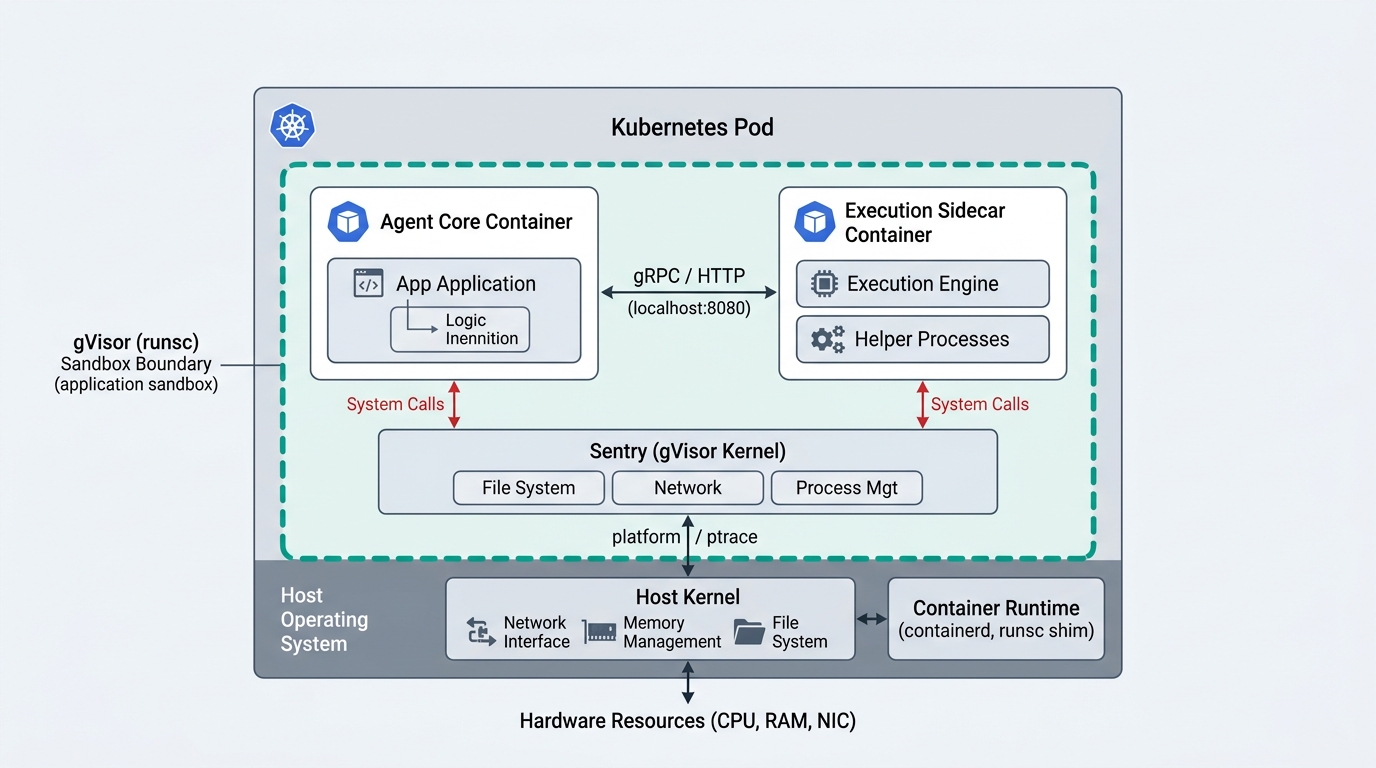
The Role of the Agent Proxy Sidecar
This separation of concerns provides several critical architectural advantages:
- Credential Isolation: The agent container never sees the API keys for your LLM providers or databases. Instead, it sends requests to
localhost:8080(the sidecar), which injects the necessary authorization headers and forwards the request to the upstream service. - Egress Filtering and Inspection: The sidecar acts as a local proxy, inspects outgoing requests, and blocks unauthorized actions. For example, if the agent attempts to exfiltrate data to an unapproved external IP address, the sidecar terminates the connection.
- State and Context Management: The sidecar can automatically persist the agent's conversation history and state to a central database, ensuring that if the agent container crashes, it can resume its task seamlessly without losing context.
Network Policy Enforcement
To enforce this architecture, strict Kubernetes NetworkPolicies must be implemented. By default, pods in a Kubernetes cluster can communicate freely. For an agent fleet, you must adopt a zero-trust network posture.
I recommend blocking all direct egress from the agent container to the external internet or other pods in the cluster, forcing all outbound traffic to route through the sidecar proxy. The sidecar container itself is then permitted to communicate only with a strictly defined list of external endpoints (such as your LLM gateway and specific database instances).
Resource Allocation and Fleet Scheduling Strategies
One of the most challenging aspects of running multi-agent fleets is their non-deterministic resource consumption. An agent tasked with debugging a codebase might run a simple syntax check, or it might accidentally trigger an infinite loop that consumes 100% of the CPU and leaks gigabytes of memory.
If these workloads are not isolated at the resource level, a single runaway agent can cause node pressure, leading to the eviction of critical platform services. To prevent this, a robust resource management strategy must be implemented using cgroups v2, Kubernetes Resource Quotas, and custom scheduling policies.
Resource Limits and Overcommit Strategies
When defining CPU and memory limits for agent pods, you must balance cost efficiency with system stability. Because agents are highly bursty—consuming significant resources during execution phases and remaining idle while waiting for LLM responses—strict limits can lead to frequent Out-Of-Memory (OOM) kills or severe throttling.
My recommended approach is to use a tiered resource allocation model:
- Guaranteed Quality of Service (QoS): For mission-critical agents, set
requestsequal tolimits. This ensures the pod is never evicted due to node resource pressure, though it increases your cloud spend. - Burstable QoS with Active Monitoring: For standard agent fleets, set
requeststo the baseline idle usage (e.g., 0.5 CPU, 512MiB RAM) andlimitsto the maximum expected burst (e.g., 4 CPU, 4GiB RAM).
To prevent burstable pods from destabilizing your nodes, this strategy must be paired with active node-level monitoring. I recommend using Prometheus to track the ratio of committed resources to actual node capacity. If the node's memory utilization exceeds 80%, your platform should automatically trigger proactive rescheduling of idle agent pods to prevent OOM cascades.
Scheduling and Node Taints
Agent fleets should never share physical nodes with your core control plane or database workloads. I recommend provisioning dedicated node pools specifically for agent execution.
You can enforce this separation using Kubernetes taints and tolerations. By tainting your agent nodes, you ensure that standard workloads are never scheduled on them, while agent pods are configured with the corresponding toleration:
tolerations:
- key: "workload"
  operator: "Equal"
  value: "agent"
  effect: "NoSchedule"
Additionally, use node affinity to force agent pods onto these dedicated nodes. This isolation boundary ensures that even if an agent manages to break out of its container and compromise the host node, it only gains access to other untrusted agent runtimes, not your production databases or internal APIs.
Implementing Secure Tool Execution: A Concrete Pattern
To illustrate these concepts in practice, let us examine a concrete, production-ready Kubernetes manifest. This configuration implements a sandboxed agent pod using the gVisor runtime, enforces strict resource limits, mounts a read-only root filesystem to prevent persistent malware installation, and utilizes a sidecar container to manage external tool execution.
apiVersion: v1
kind: Pod
metadata:
  name: isolated-agent-pod
  namespace: agent-fleet
  labels:
    app: agent-runtime
    tier: execution
spec:
  runtimeClassName: gvisor
  securityContext:
    runAsNonRoot: true
    runAsUser: 10001
    runAsGroup: 10001
    fsGroup: 10001
    seccompProfile:
      type: RuntimeDefault
  tolerations:
  - key: "workload"
    operator: "Equal"
    value: "agent"
    effect: "NoSchedule"
  affinity:
    nodeAffinity:
      requiredDuringSchedulingIgnoredDuringExecution:
        nodeSelectorTerms:
        - matchExpressions:
          - key: workload
            operator: In
            values:
            - agent
  containers:
  - name: agent-core
    image: agent-core-runner:v1.2.0
    imagePullPolicy: IfNotPresent
    securityContext:
      allowPrivilegeEscalation: false
      readOnlyRootFilesystem: true
      capabilities:
        drop:
        - ALL
    resources:
      requests:
        memory: "512Mi"
        cpu: "500m"
      limits:
        memory: "2Gi"
        cpu: "2000m"
    volumeMounts:
    - name: tmp-volume
      mountPath: /tmp
    env:
    - name: PROXY_ENDPOINT
      value: "http://127.0.0.1:8080"
  - name: execution-sidecar
    image: agent-tool-proxy:v1.2.0
    securityContext:
      allowPrivilegeEscalation: false
      readOnlyRootFilesystem: true
      capabilities:
        drop:
        - ALL
    resources:
      requests:
        memory: "256Mi"
        cpu: "250m"
      limits:
        memory: "512Mi"
        cpu: "500m"
    env:
    - name: LLM_API_KEY
      valueFrom:
        secretKeyRef:
          name: llm-credentials
          key: api-key
  volumes:
  - name: tmp-volume
    emptyDir:
      sizeLimit: 512Mi
Key Security and Operational Controls in this Manifest
When analyzing this configuration, notice several critical security controls that I have put in place to ensure safe execution:
runtimeClassName: gvisor: This forces the pod to run inside a gVisor sandbox, preventing direct access to the host kernel.runAsNonRoot: trueandrunAsUser: 10001: The agent processes run without root privileges, significantly limiting what an attacker can do if they gain shell access.readOnlyRootFilesystem: true: This prevents the agent (or any code it executes) from writing files to the container's root directory. Any temporary files must be written to the explicitly definedemptyDirvolume, which has a strict size limit of 512MiB to prevent disk exhaustion attacks.capabilities: drop: [ALL]: This strips all default Linux capabilities from the container, ensuring it cannot perform administrative actions like modifying network interfaces or mounting filesystems.
Operational Next Steps
Building a platform for autonomous multi-agent fleets requires a fundamental departure from traditional cloud-native design patterns. We can no longer trust the code running inside our containers. By treating agent runtimes as inherently untrusted, we can build resilient, secure, and highly scalable platforms that empower business logic without compromising infrastructure integrity.
To successfully implement this architecture, I recommend taking the following immediate actions:
- Audit your current agent deployments: Identify where LLM credentials and tool execution environments are located. If they reside within the same container boundary, prioritize separating them using the sidecar pattern.
- Implement sandboxing: Set up a dedicated node pool with gVisor or Kata Containers to run your agent workloads, isolating them from your core platform services.
- Enforce strict resource limits: Apply rigid CPU and memory limits to your agent pods, and configure Prometheus alerts to detect and mitigate memory leaks or execution loops before they impact node stability.
By establishing these architectural boundaries today, you will ensure that your organization can safely harness the power of autonomous agent fleets tomorrow.